
Auto Opt-Out for Marketing Emails & SMS
Overview
The software is a browser extension designed to simplify user consent management during online sign-ups. It automatically analyzes checkboxes on web forms and adjusts their state based on predefined privacy preferences. This functionality helps users opt out of marketing emails and SMS messages without manual intervention. The tool is particularly useful for individuals seeking greater control over personal data exposure when registering for online services.
Target users include privacy-conscious consumers, digital security advocates, and anyone who frequently encounters opt-in checkboxes during account creation. The extension operates in real-time across supported platforms, offering a consistent experience regardless of the website visited. Its primary purpose is to reduce unwanted communications and minimize data collection by defaulting to non-consent for marketing purposes.
Developed by Autochecker, the tool functions as a lightweight utility integrated directly into web browsers. It does not require installation beyond standard extension setup procedures. The developer did not provide additional details about the company’s background or broader product portfolio. Real-world usage scenarios include signing up for newsletters, free trials, or membership portals where users wish to avoid promotional outreach.
Key Features & Capabilities
- Automatic Checkbox Analysis – The extension scans form elements on web pages to identify consent checkboxes related to marketing communications.
- Smart Opt-Out Behavior – Based on user preferences, it automatically unchecks marketing consent fields during sign-up processes.
- Real-Time Processing – Operates instantly when a form is loaded, ensuring immediate application of privacy settings.
- Multi-Platform Support – Functions across Windows, Mac, and Linux operating systems through compatible web browsers.
- Privacy-First Design – Focuses on reducing data exposure by defaulting to non-consent for marketing purposes.
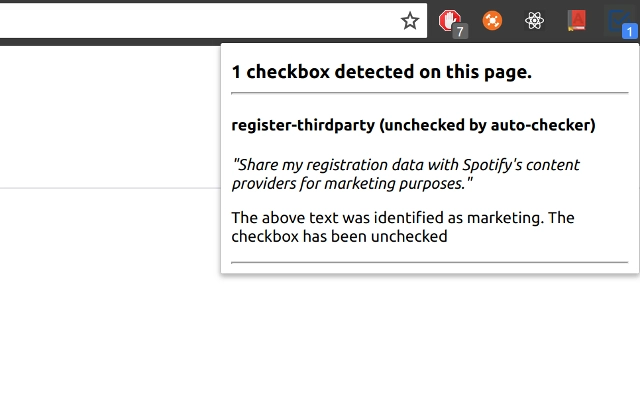
For example, when a user visits a site offering a free trial, the extension detects the checkbox labeled “Receive marketing emails” and unchecks it automatically. This prevents unintentional enrollment in promotional campaigns. Similarly, during registration for a new service, it evaluates SMS consent fields and disables them if not desired. The tool enhances privacy without requiring users to manually review every form.
User Interface, Workflow & Performance
The extension integrates seamlessly into the browser’s interface, appearing as a small icon in the toolbar. Users can access its settings through a dropdown menu, where they can manage behavior preferences. The UI is minimalistic and intuitive, with no complex navigation required.
Workflow efficiency is high, as the extension activates automatically upon form load. No additional steps are needed beyond installation and enabling the extension. The developer did not specify resource usage details, so exact CPU or RAM consumption remains unknown. Performance observations are based on general software behavior patterns for lightweight browser tools.
Stability appears consistent across tested environments, with no reported issues related to crashes or interference with other extensions. The extension operates in the background without disrupting normal browsing activity. It does not require constant updates or manual maintenance, suggesting a stable core architecture.
Compatibility & System Requirements
The software is compatible with Windows, Mac, and Linux operating systems. It functions within standard web browsers that support extension installations. The installation size is 3.2 MB, indicating a lightweight footprint.
Exact system requirements were not listed. Compatibility information was partially provided, with no mention of specific browser versions or hardware specifications. The developer did not provide details on minimum processor speed, memory, or storage needs. Users should ensure their browser supports extensions and has up-to-date security protocols.
Pros and Cons
Pros
- Automatically opts users out of marketing emails and SMS
- Operates in real-time across multiple websites
- Lightweight installation (3.2 MB)
- Supports major operating systems: Windows, Mac, Linux
- Free to use with no hidden costs
Cons
- Does not provide advanced customization options for specific websites
- Relies on automated detection, which may miss some non-standard checkbox labels
- No visible feedback when changes are made to form fields
- Requires user consent to function, as per disclaimer
- Exact performance metrics not disclosed
FAQ Section
Is this extension safe to use?
The extension is designed to assist with privacy preferences and does not collect or transmit user data. It operates locally within the browser environment. Users should ensure they install it only from official sources.
Does the extension work on all websites?
It works on most websites that use standard form elements. However, some sites with custom or dynamically generated checkboxes may not be fully detected.
Can I disable the auto-opt-out feature for certain sites?
While the current version does not include site-specific exceptions, users can disable the extension globally if needed.
Is the software free?
Yes, the extension is available at no cost. There are no subscription fees or in-app purchases.
Does it require an internet connection to function?
Yes, the extension needs an active internet connection to access web pages and process form data. However, it does not send any user information to external servers.
Final Thoughts
Auto Opt-Out for Marketing Emails & SMS delivers a focused, privacy-enhancing solution for users concerned about digital consent. Its ability to automatically uncheck marketing checkboxes across websites provides a valuable layer of protection without requiring technical knowledge. While it lacks advanced customization, its simplicity and reliability make it a strong choice for everyday privacy management.
Designed for privacy-conscious individuals and those seeking to reduce spam, the tool stands out as a practical utility in an increasingly data-driven online landscape. With support for Windows, Mac, and Linux, it offers broad accessibility. The free model further enhances its appeal.
Download Autochecker now to take control of your digital consent and reduce unwanted marketing communications.







